SNB Production WorkflowGuideCounting on a Phone
Counting on a Phone
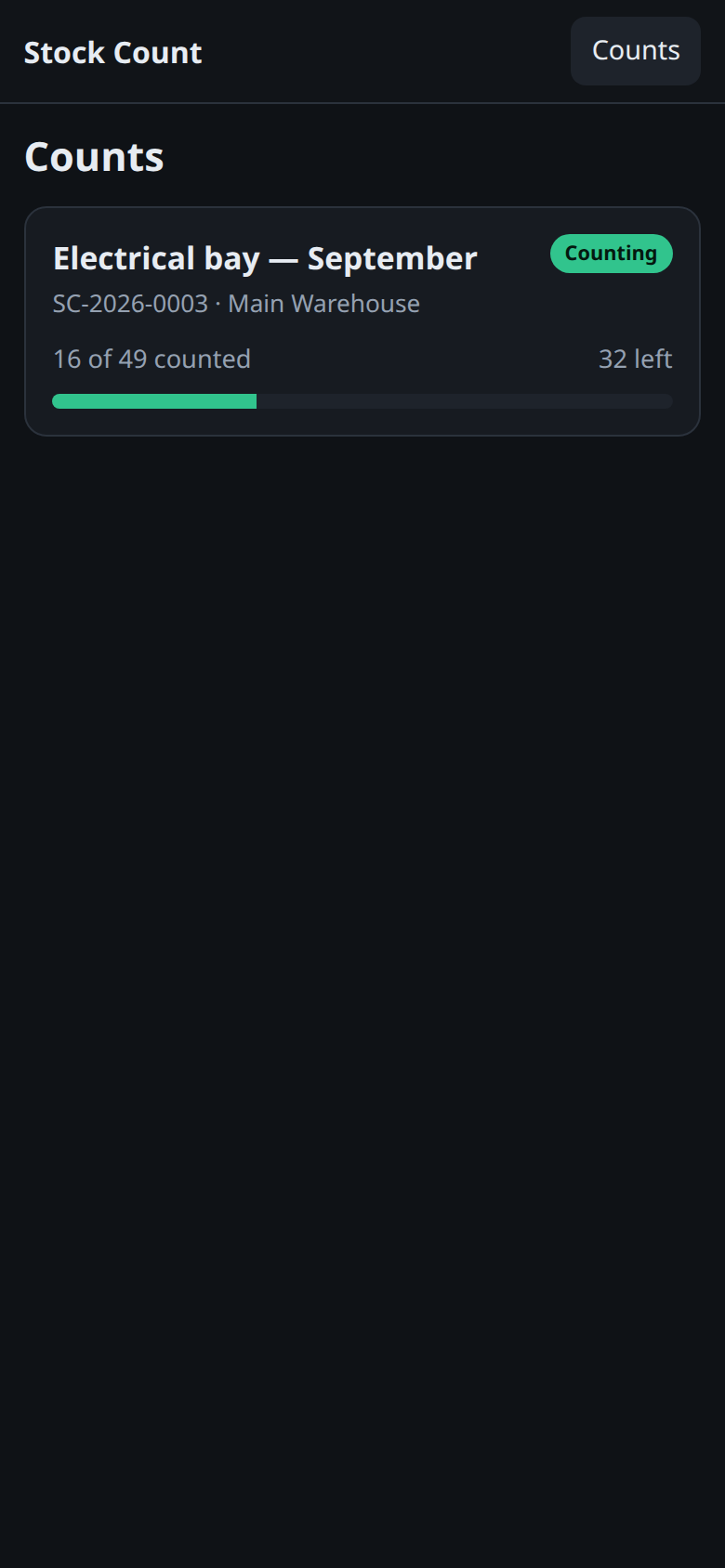
The counting app: a separate set of screens, built for a handset in an aisle. This is the way in.
Counting is not done in the admin panel. It is done on a phone, at /stock-count, on five screens of its own.
They look nothing like the rest of SNB and that is deliberate. They are dark, so a 6am count does not blind anybody; the buttons are large, because the people using them are wearing gloves; and the bottom bar clears a phone’s notch. This is the one part of the application designed to be held in one hand while the other moves stock.
Nothing on any of these screens changes stock.
A count records what is on the shelf. Turning that into a stock movement is a separate decision, made at a desk, on Inventory → Stock Counts. You can count all day and the ledger will not have moved.
1Open /stock-count
Type /stock-count after the system’s address, or follow a link somebody has sent you. Sign in as you would anywhere else.
You get Counts — one card per count you can work on. Each card carries:
- the count’s name, or its document number if it has none
- the document number and the warehouse beneath it
- a status pill —
Countingwhile it is open,Under reviewonce it has been closed - 16 of 49 counted, 32 left, and a progress bar
Tap a card to open it.
Only counts that are open or under review appear here.
A count that has been applied is finished — its numbers are in the ledger, and offering it on a phone would invite somebody to “correct” a figure that has already moved stock. A cancelled one is not work either. Neither is hidden; they are simply not on the list of things to do.
2If the list is empty
The screen says so, and says what to do about it:
No counts are open. Somebody opens one from Inventory → Stock Counts.
That is not a fault and not a permission problem. Nobody has opened a count yet.
What happens next
Opening a count lands you on the shelf list, which is the screen you will spend most of the time on. The three tabs across the top — Items, Count and Summary — are the whole app, and each has its own page here.
Stock Count, top left, brings you back to this list.
If it goes wrong
| What you see | What it means |
|---|---|
| A permission message instead of the list | Your role cannot see stock counts. That is set on the role, not on the phone — see Settings → Reading permissions. |
| The count you were told about is not listed | It has been applied or cancelled, or it was never opened. Check Inventory → Stock Counts at a desk. |
| Everything is in English | These screens are, as is most of SNB. Only the factory screen is translated. |