SNB Production WorkflowGuideA Job's Own Story
A Job's Own Story
Everything that happened to a job, in order, with who did it and when — under seven headings that always render, even empty.
The Timeline tab is the last on the strip, and that is where it belongs: the record’s facts first, then its related records, then its history.
1Read the rail
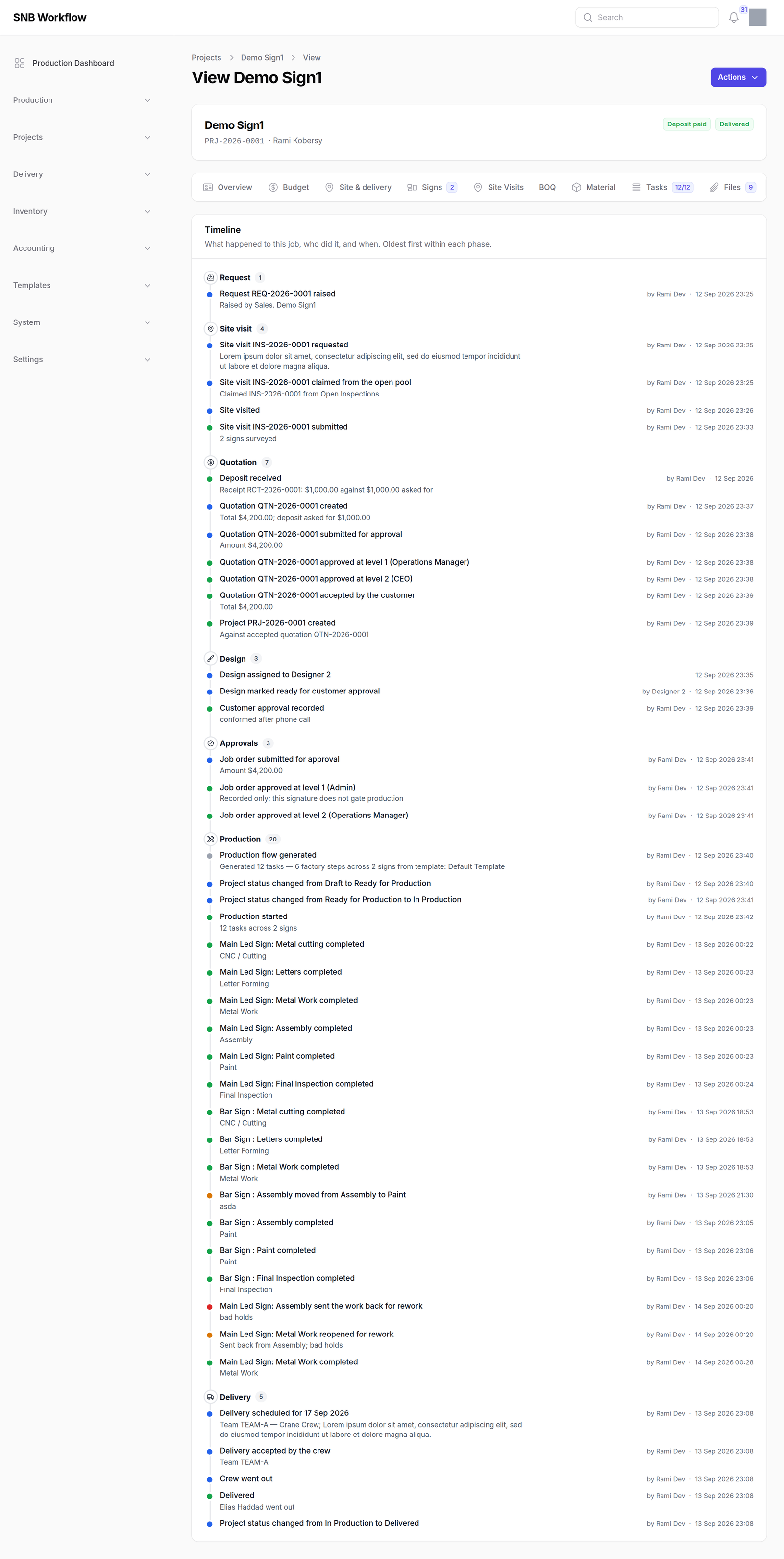
Seven headings, always in this order, with a count beside each:
Request · Site visit · Quotation · Design · Approvals · Production · Delivery
Under each, a line per fact — what happened, any detail worth a second line, who did it and when. Oldest first within a phase.
Every heading renders even when it is empty, and says which zero it is.
A rail whose headings come and go depending on the data cannot be read at a glance — you would have to work out whether a missing heading meant nothing happened or the phase does not apply.
“No site visit on this job” is itself a fact worth a line, and a repeat order legitimately has none.
2What is on it, and what is not
The entries are read from the records that own them — the columns the services stamp, the task log the floor writes, the approval steps with their signatures. There is no history table and none is invented.
Milestones and step completions are on it. Per-step starts, holds and dispatches are not.
A twenty-step job with every start, hold and dispatch on the rail is four hundred lines, and a reader looking for when the customer approved the design would have to find it among them.
What a timeline is for is the shape of what happened. The detail of one step is on the step.
Money is the quotation and the receipt that completed the deposit — or its waiver — and nothing else.
3The entries that only live here
A few facts have no record of their own, and the timeline is where they are kept: a customer’s verdict on a design, a hold and its reason, a step moved from one department to another with both named.
What happens next
Nothing — this panel is a record. It is the answer to “who moved this, and why” six months later, and the reason the manual keeps telling you that deactivating beats deleting.
If it goes wrong
| What you see | What it means |
|---|---|
| A heading with nothing under it | Read the sentence — it says which zero it is. |
| A step you know was worked is not listed | Per-step starts, holds and dispatches are not on the rail. The step itself has them. |
| An entry with no name against it | The account that did it has since been removed. The record of what happened is intact; only the link to the person is gone. |
| Production shows more than you expected | It carries every step completion, and a job with three signs has three chains of them. |