SNB Production WorkflowGuideThe Delivery Week
The Delivery Week
Every trip the crews are making this week, who is making it, and how far each one has got.
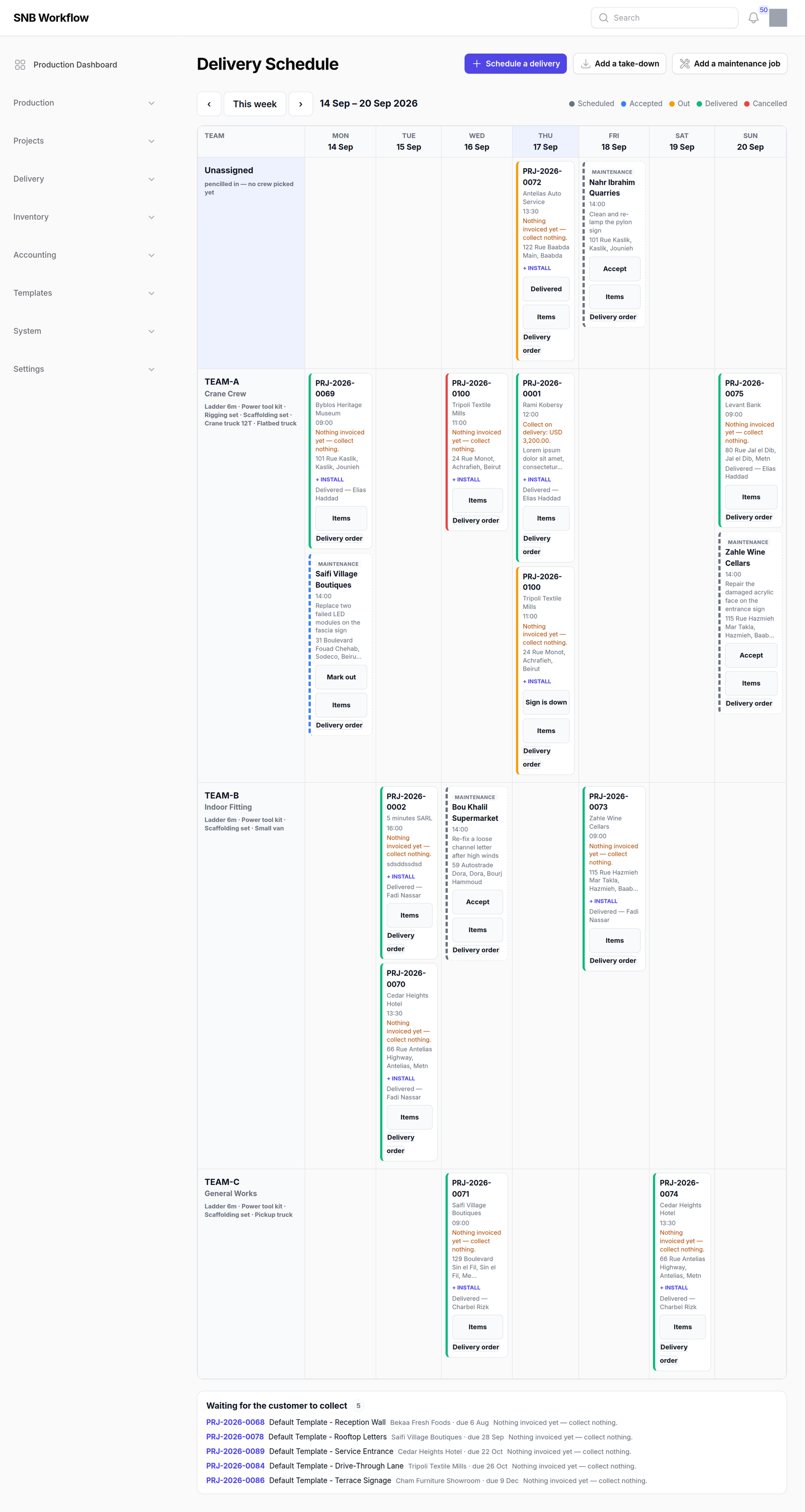
Delivery → Delivery Schedule. Teams down the left, seven days across, one card per trip. The week navigation moves a whole week at a time and always lands on a Monday.
1The board
Each team’s row names the crew and lists the kit it is carrying — ladders, rigging, which truck. A card sits in the cell where that team meets that day.
Above the board is an Unassigned row: pencilled in — no crew picked yet. A trip can be booked for a day before anybody decides who does it.
A card carries the job, the customer, the time window, the site address, what kind of trip it is, and what the crew is expected to collect — either Collect on delivery with an amount, or Nothing invoiced yet — collect nothing.
2What the colours mean
| Scheduled | booked, and nobody has said yes yet |
| Accepted | the crew has taken it |
| Out | the vehicle has left |
| Delivered | finished |
| Cancelled | called off, and kept on the board |

3The collect list
Underneath the week: jobs the customer is coming to collect rather than having delivered.
These appear on no other screen in the application.
They are not trips, so they are on no crew’s day and in no week. If this list is not read, a finished job can sit in the factory indefinitely with nobody wondering why.

What happens next
A trip moves up one rung at a time — Accept, then Out, then the last word, which changes with the kind: Delivered for a delivery, Completed for maintenance, Sign is down for a take-down.
Only the last rung asks anything, because it is the only move on this board that cannot be undone. Scheduling a trip is Scheduling a delivery; the other two kinds are Take-downs and maintenance.
If it goes wrong
A trip cannot be moved or cancelled from this board.
There is no reschedule and no cancel anywhere on this screen — not on a card, not in a menu. The system knows how to do both, and nothing offers it.
In practice: finish the trip as it stands, or leave it. A trip booked on the wrong day stays on the wrong day.
A crew cannot be changed either. A trip pencilled in as Unassigned stays Unassigned. Pick the team when you book it.
A job you expected is not on the board. It may be a collect job — look at the list underneath. Otherwise it has not been scheduled: it will be offered by Schedule a delivery if it can be.
The money line says nothing is invoiced. That is what it says. The crew collects nothing, and somebody in the office needs to know before the trip rather than after it.