SNB Production WorkflowGuideThe First Screen
The First Screen
What the dashboard is telling you, and which half of it is worth acting on.
This is where signing in puts you. Nine panels, and the useful division is not top-to-bottom but numbers you act on, then shapes you read.
Everything here is a count of live records. Nothing on this page changes anything.
You will not see all nine.
Each panel is shown only to somebody whose role can see that kind of data, and a panel with no permission behind it is simply absent — not greyed out, not empty. A Stock Manager signing in sees a nearly bare dashboard, and that is correct rather than broken.
1The whole screen
Top to bottom: six production numbers, four design numbers, four charts, and two tables.
The last panel does not exist until you scroll to it.
Recent Open Issues is loaded only when it comes into view. Land on the dashboard, read the top, and leave, and that panel was never fetched at all. This matters if you are ever told the page is “missing” something — scroll to the bottom before believing it.

2The six production numbers
| Reading | What it counts |
|---|---|
| Active Projects | every job that is not closed, cancelled or delivered — with how many are past their deadline |
| Waiting Dispatch | steps released to the factory that a manager still has to send to a department |
| In Progress | steps somebody is working on right now |
| Completed Today | steps finished since midnight |
| Open Issues | problems reported and not yet resolved |
| Total Reworks | how many times work has been sent back, across all active tasks |
Waiting Dispatch is the one to act on. Those steps are released, the factory owns them, and no department screen is showing them to anybody. They sit there until a person sends them. See Dispatch and transfer.
Three of the six have a trend line and three do not.
A line is drawn only where the system actually keeps a history. Tasks completed, issues opened and reworks recorded are all dated events, so they can be counted per day. Active Projects, Waiting Dispatch and In Progress are counts of how things stand now — nothing anywhere records how many projects were active last Tuesday.
A trend line invented from today’s figure would look exactly like a real one, so the missing three are left blank on purpose.

3The four design numbers
Design sits upstream of the factory, which is why it is second.
The sentence above the numbers is the most useful line on the dashboard: either the longest a design has been sitting with a customer, or “Nothing is with a customer. Everything below is inside the factory.”
That distinction is the whole point. Work waiting on a customer is work nobody here can move. Work inside the factory is work somebody here can.
Each of the four is a link into the Design Queue.
Four zeroes would read like a broken panel, so when there is genuinely no design work the panel says so in words instead.

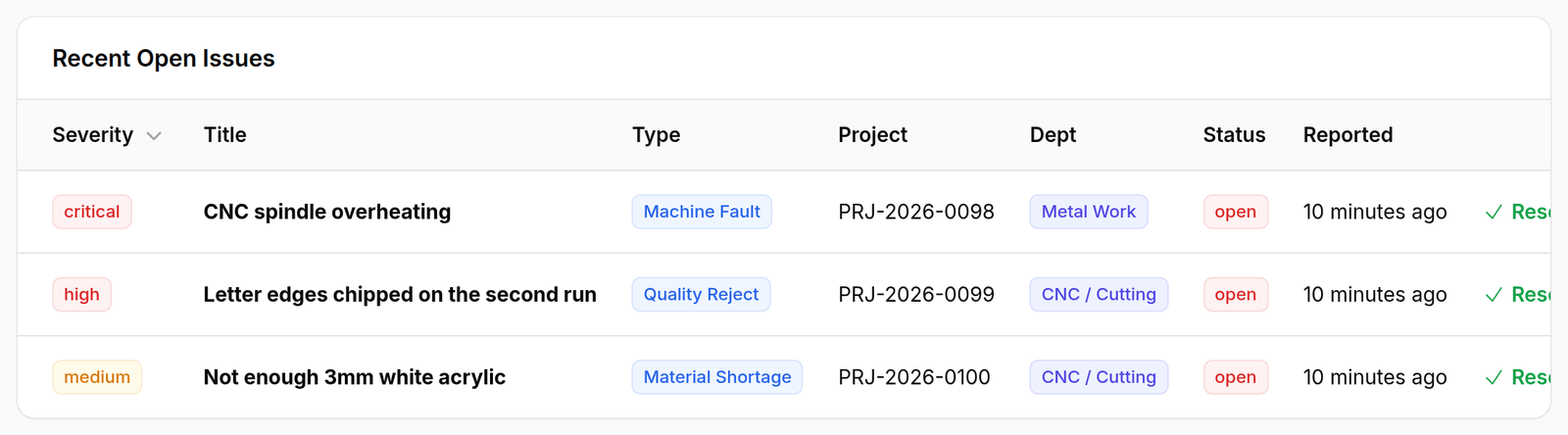
4Recent open issues
Up to fifteen unresolved problems, worst first — critical, then high, then medium, then low, and newest first inside each band.
Project can be empty. A shortage raised against a stock transfer is not about a job, and the column says Not about a job rather than leaving a gap.
Each row ends with Resolve, which opens the the Issues list list. At this width the table runs off the right-hand edge, so scroll it sideways to reach that button.
What happens next
Nothing here is a queue you work through. Two of the numbers point at pages that are:
- Waiting Dispatch → the work is on The floor board, waiting to be sent.
- Open Issues → the Issues list.
And the page that answers “where is this job stuck?” is not on the dashboard at all — it is Waiting for a person.
If it goes wrong
The numbers look wrong for the factory you can see. Every count excludes removed steps and counts a split job once rather than once per piece. A four-day job cut into four afternoons is one task here.
A panel is missing. Either your role cannot see that kind of data, or you have not scrolled far enough for it to load. Check the second before raising the first.
Completed Today is zero in the afternoon. It counts by the moment a step was completed, not by when it was worked on. A step finished at 23:50 yesterday belongs to yesterday.