SNB Production WorkflowGuideMy Inspections
My Inspections
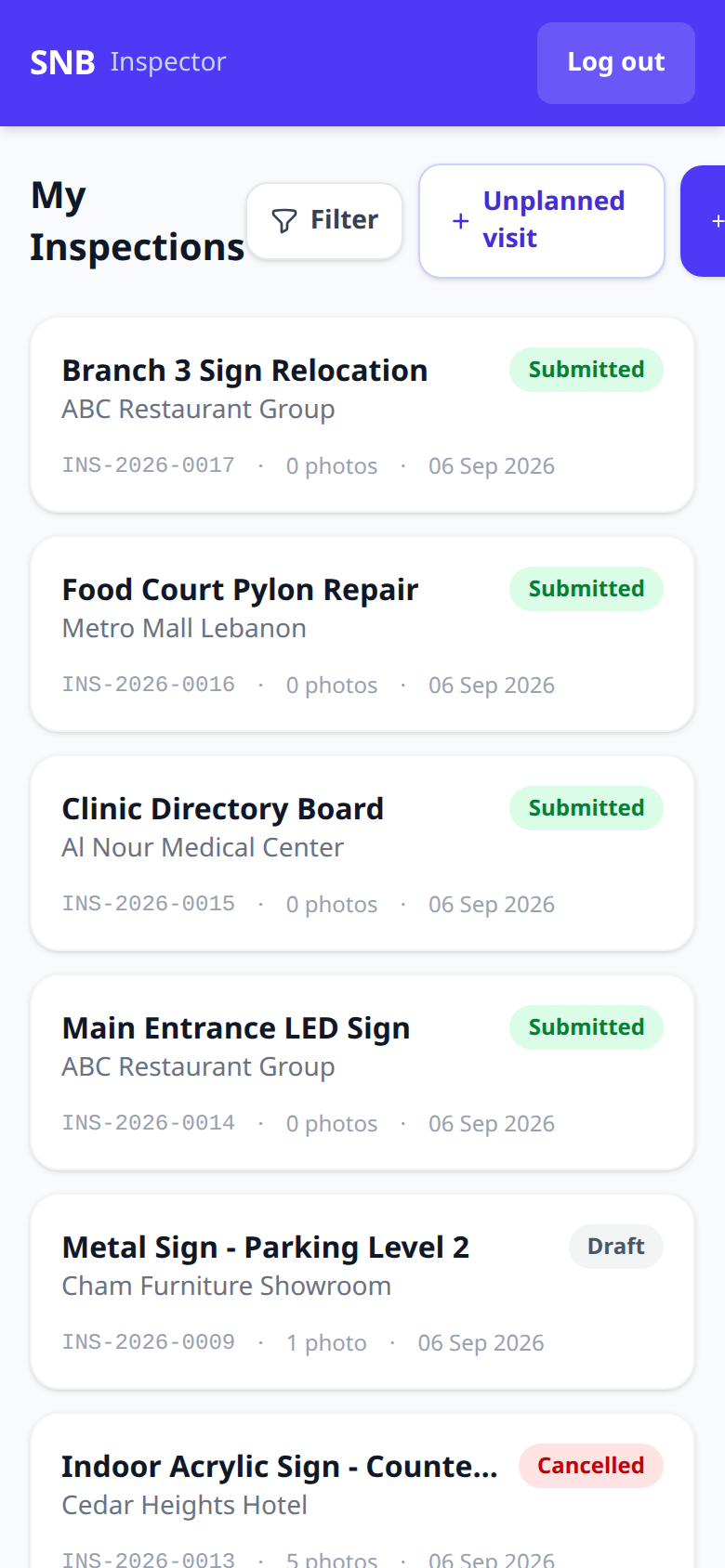
The inspector's own screen, on a phone: the visits that are theirs.
This is a different screen from the office’s Inspections list. It is built for a phone, held in one hand, on somebody else’s premises.
Reach it at /inspector.
1The list
Each visit is a card carrying the job title, the customer, its status, the inspection number, how many photographs have been taken, and the date.
The statuses seen here are Submitted, Draft and Cancelled. A Draft is a visit started and not finished — it is the one to look for when you come back to the office.
Three controls sit above the list:
- Filter
- Unplanned visit — a survey nobody booked
- Raise a request — the commercial door, covered separately
The third button is cut off on a narrow phone.
Measured while capturing this page: the screen lays out 473 CSS px wide inside a 390 px viewport, so Raise a request runs off the right-hand edge and has to be scrolled to sideways. The other screens in this module fit; this one does not.
It is not a fault in your phone. If the button is missing, scroll the row of controls to the left — and it is worth telling whoever maintains the application, because a control nobody can see is a control nobody uses.
The photograph count is on the card, before you open anything.
A submitted survey showing 0 photos is the one worth checking: on most jobs the pictures are the survey. Putting the count on the list means nobody has to open six visits to find the empty one.
What happens next
Tap a card to open the visit and fill it in. Log out is top right — these are shared phones as often as personal ones.