SNB Production WorkflowGuideDesign Jobs
Design Jobs
Every design job in the building, who holds it, and how many times the customer has sent it back.
A design job is one project’s artwork, from the moment a designer picks it up to the moment the customer approves it.
There is no “New design job” button.
A design job is created by Assign Designer on an inspection. It always has a survey behind it — which is what guarantees the designer has measurements to work from rather than a description over the phone.
1Open the list
Go to Design Jobs.
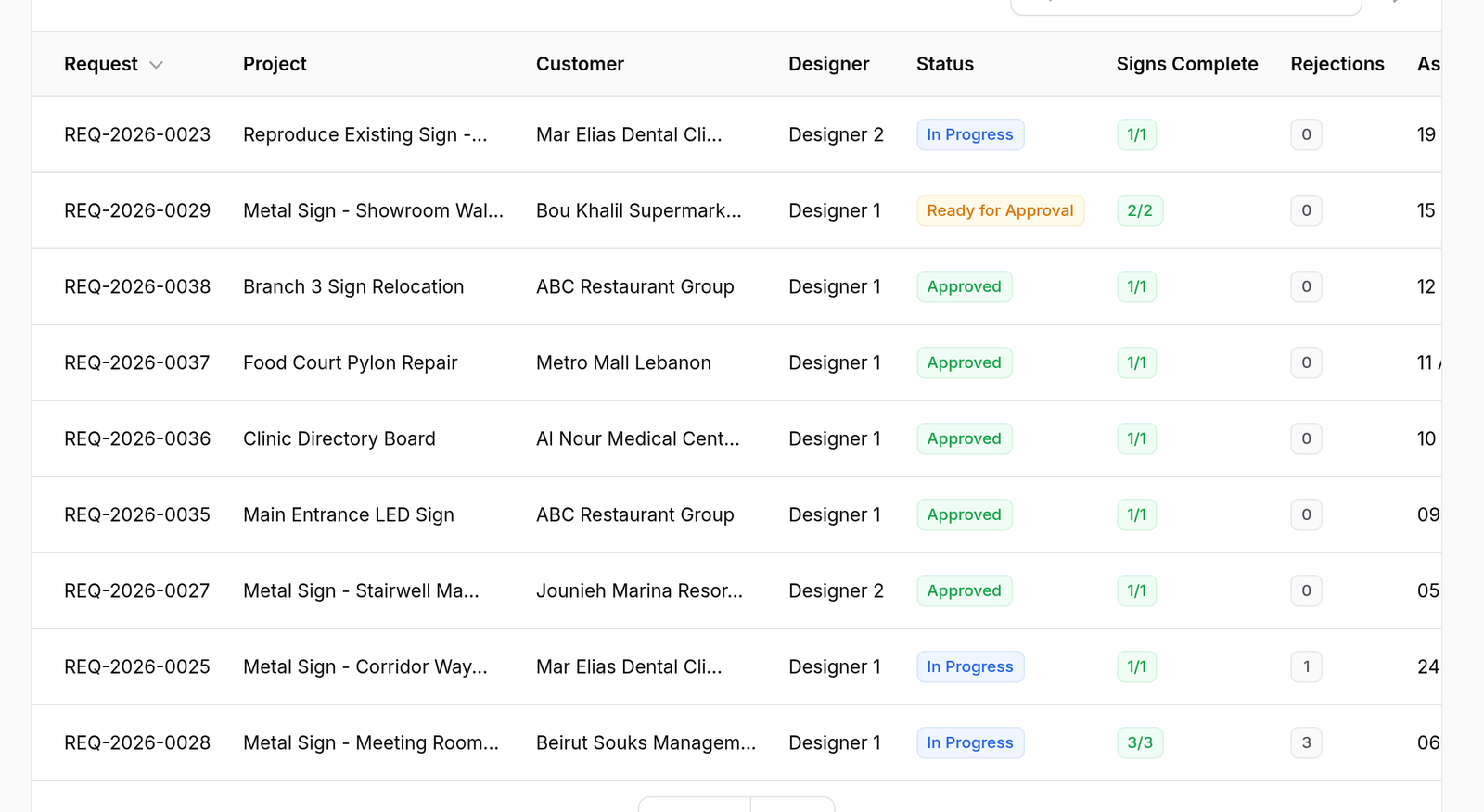
Eight columns: Request, Project, Customer, Designer, Status, Signs Complete, Rejections and Assigned.
Two of them are the ones to read:
- Signs Complete is a fraction — a job is not finished because someone has been working on it, it is finished when every sign on it is
- Rejections counts how many times the customer has sent the design back
Rejections is a column rather than a detail because it is the number that predicts trouble.
A job on its third rejection is not a design problem to be solved by drawing it again — it is usually a brief that was wrong from the start, and it needs a conversation rather than another revision.
2The row menu
Press ⋮. Three actions: Workspace, View and Edit.
Workspace is where the work actually happens, and it has a page of its own.

What happens next
An unassigned job sits on Open Jobs until a designer claims it or a manager assigns it.