SNB Production WorkflowGuideThe Floor Board
The Floor Board
Every department's open work on one tablet, read three ways — by department, by sign, or by job.
The kiosk serves one department. This is the screen in between: /floor, the whole factory on one tablet.
A normal login, not a PIN.
Every kiosk action is signed with a PIN because the screen is on a wall and anybody can walk up to it. This screen is a manager’s own tablet, so the manager signs in as themselves and every write is recorded under their own name.
1The tiles
Five totals across the top — Running, Ready, On hold, Waiting dispatch, Overdue — and then a tile per department with the same four counts of its own.
A department with nothing on it says Nothing running rather than showing four zeroes.

2Open a department
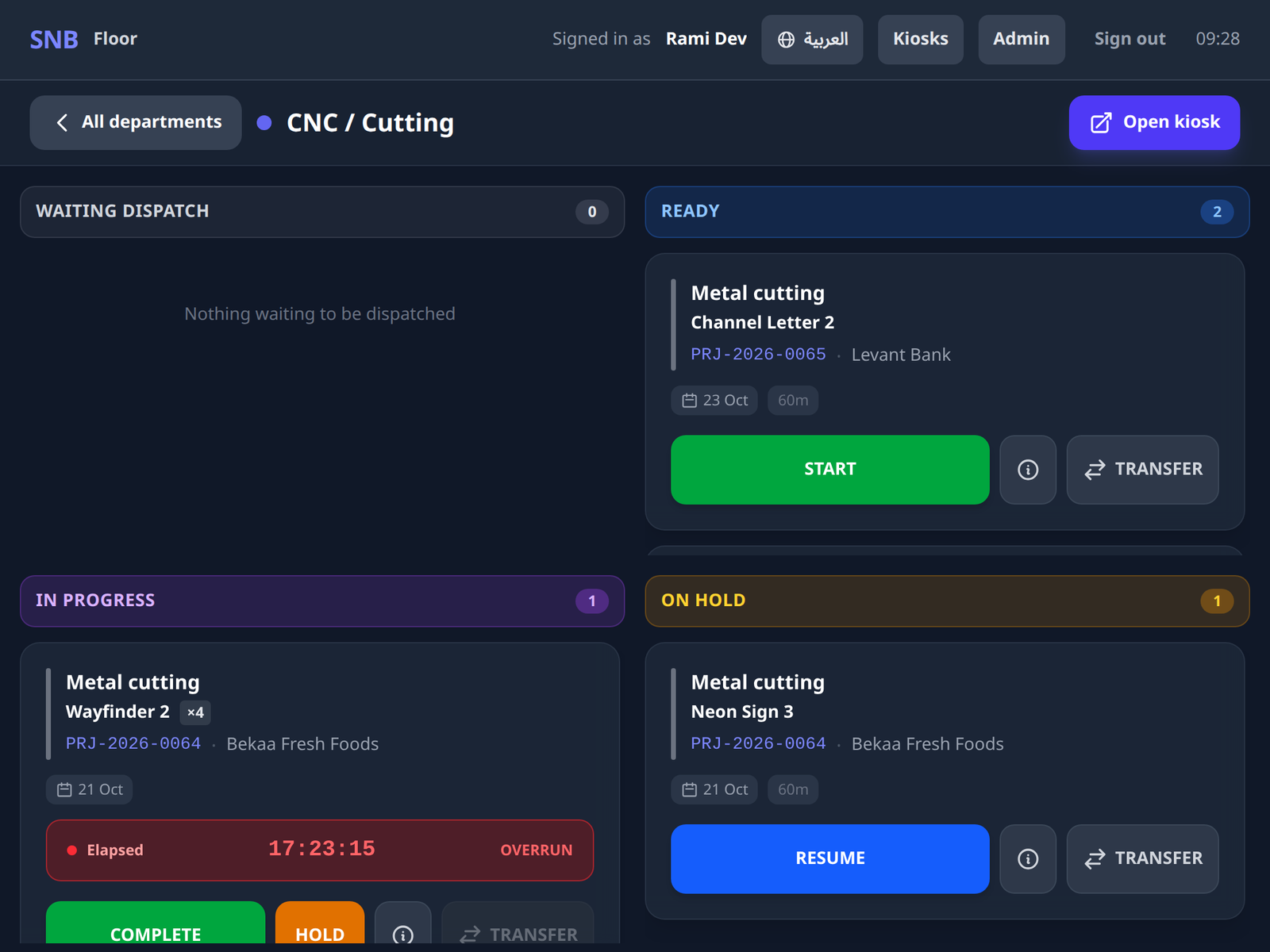
Tap a tile. That department’s work, in four columns:
| Column | What is in it |
|---|---|
| Waiting dispatch | released work a manager has not yet sent to the department |
| Ready | work the department can pick up |
| In progress | work being done now |
| On hold | work that was stopped, and why |
The first column is the one no kiosk shows.
A step whose template says a manager dispatches it does not appear on the department screen when the work reaches it. It waits here until somebody sends it — which is the whole point of the column, and the reason this board exists rather than a wall of kiosks.
The cards are the kiosk’s own, with the kiosk’s verbs — START, COMPLETE, HOLD, RESUME — plus the two only a manager has, and Open kiosk, which is the door to that department’s own screen.
A split task is one card here and moves whole.
The kiosk works the pieces. This board moves the task, and says so on the card: “Worked in pieces on the kiosk; move the whole task from here.”
3Read it by sign, or by job
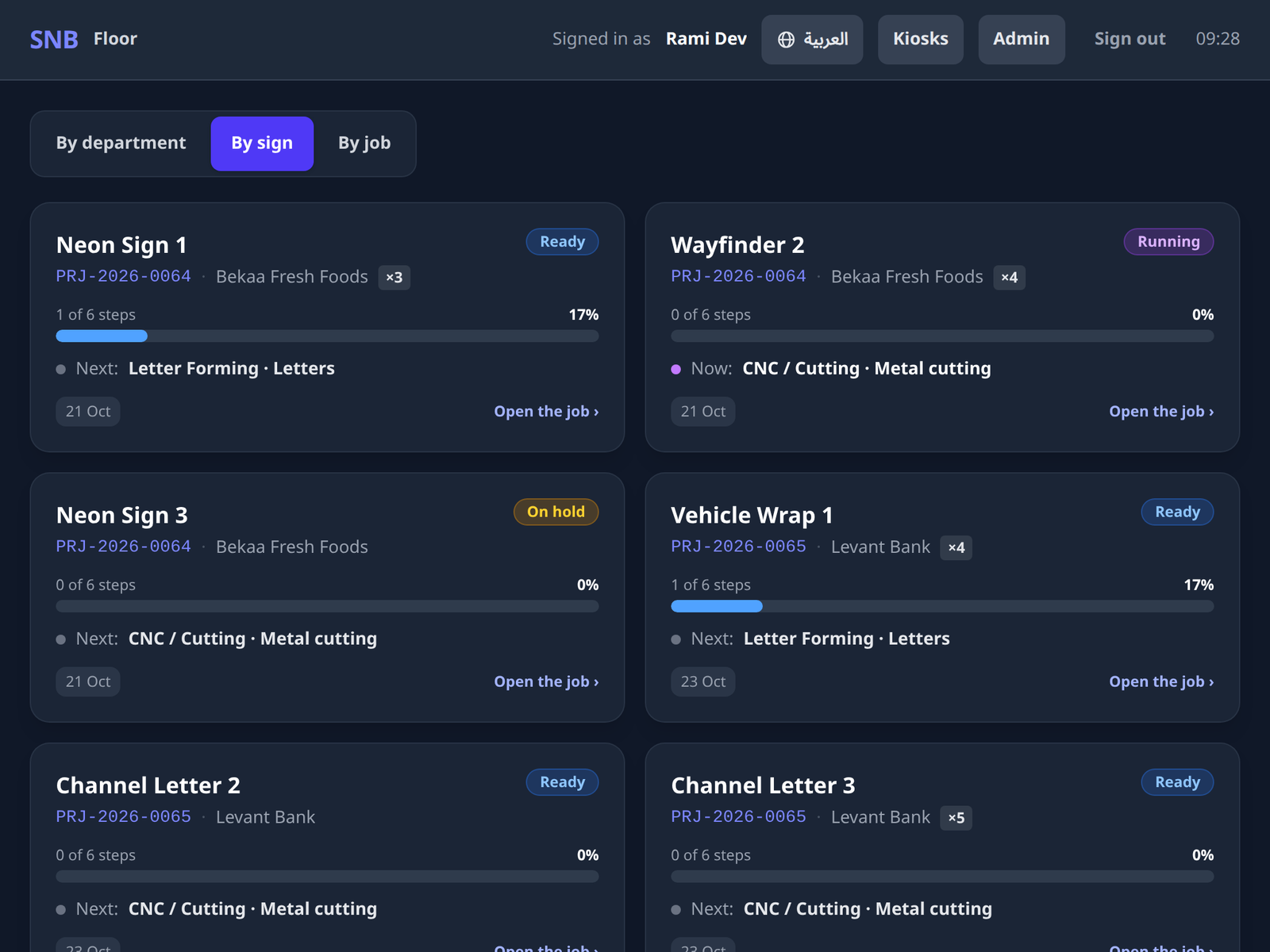
The three buttons at the top are the same facts in three orders:
- By department — where the work is
- By sign — what is being made: a card per sign with how far along it is, the step it is on now, what is next, and whether it is late
- By job — who it is for: a card per job, its status, and a progress figure that is the mean of its signs’ progress
The mean, rather than the total, so a small sign is never hidden behind a large one. A job that is nine-tenths done on its big sign and untouched on its small one is not nine-tenths done.
Finished signs, unstarted jobs and steps belonging to no sign stay off the order book: this is a board of what is on the floor now.
Tapping a card opens the job as the floor sees it — the signs it makes, the selected sign’s flow drawn with the same diagram the office uses, its files, and the same picture gallery with that sign first.
What happens next
The two manager verbs have their own page: Dispatch and transfer.
If it goes wrong
| What you see | What it means |
|---|---|
| No department has a kiosk screen yet | No department is set up for the floor. That is a Settings job. |
| A verb is dim on every card | Your role does not hold that kiosk permission. A Production Manager holds none of the four by design — they distribute and monitor work rather than run a machine. |
| A refusal instead of an action | Each verb is checked when you tap it and again at the write. A refusal is a sentence, never a hidden button. |
| Nothing is being made on the floor right now | Nothing is in progress on any sign. Check By department — there may be work ready that nobody has started. |